
Understanding RTSP for Live Streaming
A Comprehensive Guide

What is RTSP?
RTSP stands for Real-Time Streaming Protocol. It was developed in the 1990s by RealNetworks, Netscape Communications, and Columbia University. The original specification was standardized by the Internet Engineering Task Force (IETF) in 1998 as RFC 2326.
The protocol was designed to provide control over real-time multimedia sessions in a way similar to how a remote control operates a media player.
An important distinction is that RTSP normally does not carry the actual video or audio data itself. Instead, it establishes and controls the streaming session. The media is typically transported separately using RTP (Real-time Transport Protocol).
RTSP is particularly common in video surveillance. Many IP cameras and Network Video Recorders (NVRs) expose RTSP streams that can be consumed by video management systems, media players, analytics applications, or recording software.
RTSP, RTP and RTCP
RTSP streaming commonly involves three related protocols: RTSP, RTP, and RTCP. Although they work together, each has a different responsibility.
RTSP — Real-Time Streaming Protocol
RTSP is responsible for establishing and controlling the streaming session. It handles commands such as SETUP, PLAY, PAUSE, and TEARDOWN.
Think of RTSP as the control layer of the streaming system.
RTP — Real-time Transport Protocol
RTP is normally responsible for transporting the actual real-time media packets, such as encoded video or audio.
An RTP packet contains information such as sequence numbers and timestamps. These allow the receiver to reconstruct the media stream in the correct order and timing.
RTP can carry video encoded using formats such as H.264 or H.265, but RTP itself is not a video compression format.
RTCP — RTP Control Protocol
RTCP works alongside RTP and provides information about the quality and status of an RTP session.
It can provide statistics such as packet loss, timing, jitter, and other reception information. This allows participants or streaming systems to monitor the quality of the media transmission.
Connection, RTSP URL and Port 554
An RTSP session typically follows a client-server architecture. The client connects to an RTSP server and requests access to a particular stream.
The standard TCP port assigned to RTSP is port 554.
An RTSP URL therefore often looks similar to:
rtsp://192.168.1.100:554/stream
Because 554 is the default RTSP port, it can usually be omitted:
rtsp://192.168.1.100/stream
The exact path following the host depends on the camera, encoder, or streaming server.
With IPCamLive, the IP camera or video encoder acts as the RTSP server, while the IPCamLive servers act as RTSP clients. This means that the connection is initiated by the IPCamLive servers: they connect to the camera or encoder and request the configured RTSP stream.
As a result, the camera's RTSP service must be reachable from the Internet. If the camera or encoder is located on a private network behind a router, the incoming RTSP connection must be forwarded to the device. This typically requires configuring port forwarding (NAT) on the router and ensuring that the corresponding port is permitted by any firewall protecting the network.
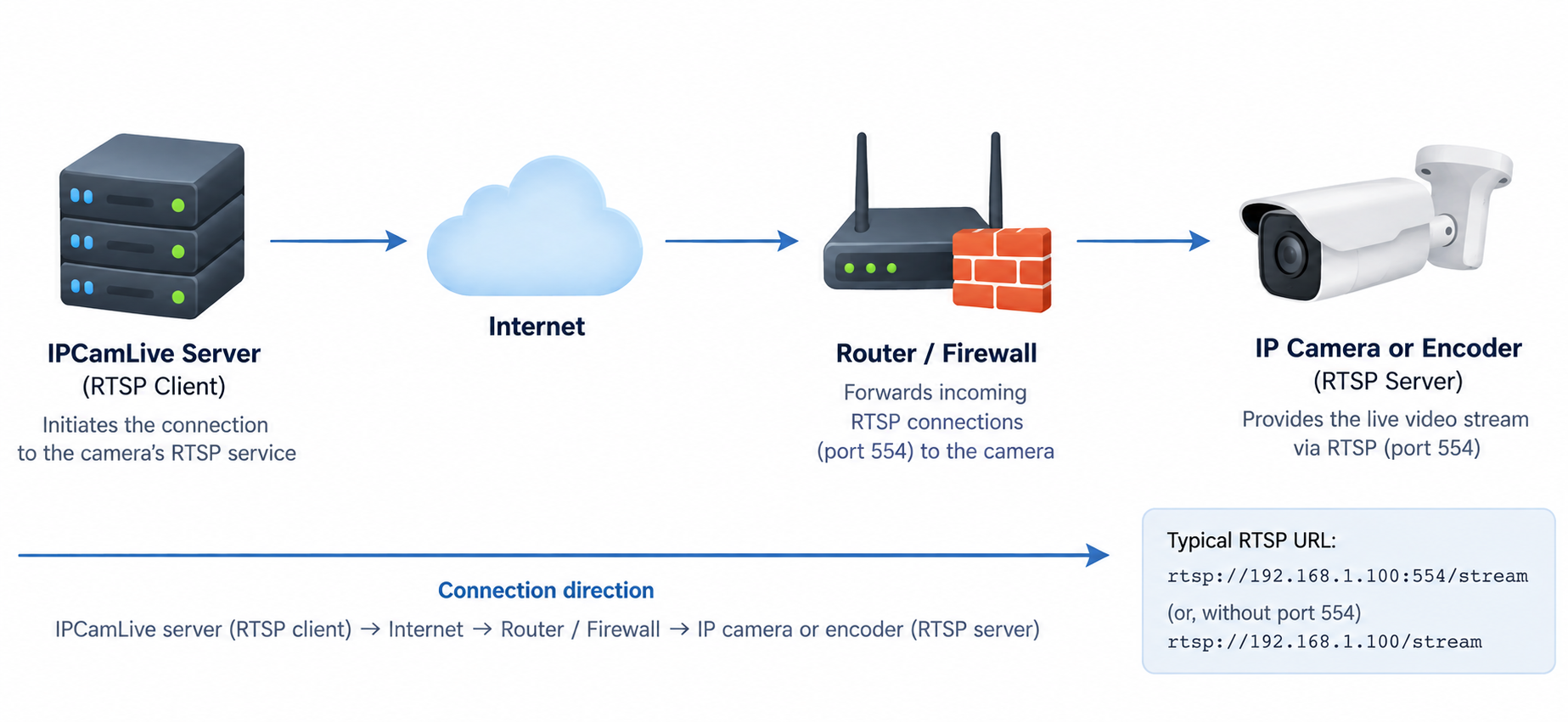
Therefore, for a direct RTSP connection to work, the network hosting the camera must allow the IPCamLive servers to establish an incoming connection to the camera's RTSP service.
RTSP over UDP and TCP
RTSP-based streaming can operate with both UDP and TCP media transport. The choice has an important effect on reliability, latency, and network compatibility.
The available transport mode depends on the capabilities and configuration of the IP camera or encoder. Some devices support only TCP or UDP for RTSP media transport, while others support both transport modes.
RTP over UDP
UDP is traditionally used for real-time media because it has very little transport overhead.
If a packet is lost, UDP does not wait for it to be retransmitted. The stream simply continues. This behavior is often desirable for live video because receiving the newest frame is usually more important than recovering an old packet.
UDP offers low latency and low protocol overhead, performs well on reliable local networks, and is particularly well suited for live video streaming.
The disadvantage is that packet loss can result in visible artifacts, corrupted frames, or temporary degradation of video quality.
RTP over RTSP/TCP
RTSP can also use interleaved RTP over the existing RTSP TCP connection.
TCP guarantees ordered and reliable delivery. Lost packets are retransmitted, which can significantly reduce video corruption caused by packet loss and generally provides a more stable stream over Internet connections.
However, retransmission can also increase latency. A lost packet may temporarily delay packets that arrived after it, a behavior associated with TCP's ordered delivery.
TCP transport is also useful when UDP traffic is blocked by firewalls or difficult to route through a network. When RTP is interleaved over the RTSP TCP connection, the RTSP control messages and media packets can travel through the same TCP connection, which can simplify communication through NAT routers and firewalls.
IPCamLive supports both TCP and UDP transport. When establishing an RTSP connection, IPCamLive automatically detects which transport modes are supported by the camera and selects a mode that works correctly with the device and its network configuration.
For streaming over the Internet, IPCamLive generally prefers TCP. Compared with a controlled local network, Internet connections typically involve longer network paths, more intermediate network devices, and a greater possibility of packet loss or varying network conditions. Because TCP provides reliable and ordered packet delivery with retransmission of lost packets, it generally results in a more stable video stream with fewer corrupted frames and visual artifacts.
Video Compression
RTSP is not a video compression technology.
Instead, it can be used to control streams carrying video encoded with different codecs. Common codecs found in RTSP systems include:
H.264 / AVC — One of the most widely supported video compression standards. It provides a good balance between image quality, bandwidth, processing requirements, and compatibility.
H.265 / HEVC — A newer and more efficient compression standard. It can provide similar visual quality to H.264 at a lower bitrate, although it generally requires more processing power and may have more limited compatibility.
MJPEG — Encodes individual video frames as JPEG images. It is simple and can provide good image quality, but typically requires significantly more bandwidth than modern inter-frame codecs such as H.264 and H.265.
The selected codec, bitrate, frame rate, resolution, GOP structure, and encoder configuration can all have a major effect on bandwidth requirements, image quality, and latency.
IPCamLive is capable of receiving and processing video streams using any video compression format supported by its RTSP streaming system. This provides broad compatibility with IP cameras and video encoders using different video codecs and configurations.
RTSP Latency
One of the major advantages of RTSP-based streaming is its ability to provide relatively low-latency video, especially on controlled local networks.
However, there is no single fixed latency for RTSP. End-to-end latency is influenced by the complete video pipeline:
Camera capture → video encoding → network transmission → buffering → decoding → display
Several factors can increase latency, including:
- GOP and keyframe interval
- Network congestion / Packet loss / TCP retransmissions
- Receiver buffering
- Decoder performance
- Display buffering
For this reason, changing the transport from TCP to UDP alone does not necessarily guarantee low latency. The encoder and player configuration can be equally important.
IPCamLive provides a low-latency mode designed to minimize the delay between the camera and the viewer. Instead of standard HLS, which introduces additional latency due to segmentation and buffering, this mode uses a direct WebSocket connection to deliver the video with significantly lower delay.
RTSP Encryption and Security
Traditional RTSP was not designed with encryption enabled by default. A standard RTSP connection can therefore expose control messages and, depending on the transport configuration, the associated media traffic to network observers.
Several technologies can be used to secure an RTSP-based system.
RTSPS — RTSP over TLS
RTSP can be transported over TLS, resulting in an encrypted control connection. This is commonly referred to as RTSPS and typically uses an URL beginning with: rtsps://
SRTP — Secure Real-time Transport Protocol
When the media itself must be protected, SRTP can be used instead of ordinary RTP.
SRTP provides security mechanisms for RTP media, including encryption and authentication.
It is important to distinguish between securing the RTSP control channel and securing the media channel. Encrypting RTSP with TLS does not automatically mean that every implementation also encrypts the RTP media. The exact security architecture depends on the server, camera, client, and negotiated transport method.
IPCamLive considers data security an important part of live video streaming and supports both RTSPS and SRTP to provide secure and encrypted communication between cameras and IPCamLive servers.
Summary
RTSP remains one of the most important protocols for live video streaming from IP cameras and video encoders, providing flexible session control, low latency, and support for various transport modes and video compression formats.
IPCamLive provides comprehensive RTSP support specifically optimized for reliable live video delivery over the Internet and long-distance connections. With automatic TCP/UDP transport selection, broad video codec compatibility, low-latency web playback, and support for secure streaming technologies such as RTSPS and SRTP, IPCamLive is designed to handle a wide range of IP cameras, encoders, network environments, and streaming scenarios.